Interpreting White and Black Point Targets
Relative Values
Relative values are used to assess separation in the highlights (white point evaluation) and shadows (black point evaluation). These values are relative to the specific test value. In this example, 240 RGB is the specific test value. The relative values are +3 (243), +1 (241), -1 (239), and -3 (237). If the specific test value were 247 RGB, the relative values would be +3 (250), +1 (248), -1 (246), and -3 (244).
By visually comparing the specific test value to the relative values, the amount of tonal separation can be determined. Testing has shown that most ink-jet printers cannot separate white values higher than approximately 250 RGB or black values lower than 15 RGB. However, there are many variables, most importantly the media used with the printer. If you leave your white point and black point at their default settings, 255 RGB and 0 RGB, respectively, it will blow out your highlights and block up your deepest shadow areas. You will lose about 8% of your image's tonal range. The tones from 250 RGB to 255 RGB will all be 255 (paper base white) and from 0 RGB to 15 RGB will all be 0 RGB (maximum black).
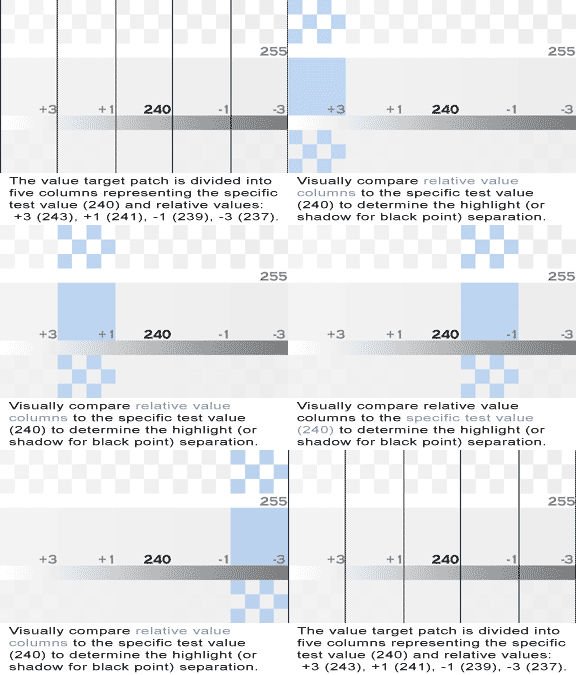
Relative Values for White and Black Point Evaluation
The image to the left illustrates the relative values for a specific test value of 240 RGB. Highlight separation (or shadow detail for the black point) can be determined by visually comparing the relative values to the specific test value.

Gray Ramp
Grayscale Neutrality—Gray Ramp
A gray ramp is included in the target patch as a reference for grayscale neutrality. The white-point gray ramp spans from 255 RGB to 128 RGB. The black-point gray ramp spans from 128 RGB to 0 RGB. This gray ramp is used to check the neutrality of the grayscale. This is no longer a common problem, but if it exists, a color shift will be noted in certain gray-value ranges. This is usually a fault of the print driver's color look-up table (LUT). This can be rectified by using a third-party print driver or raster image processor (RIP).
The image to the left shows the white-point gray ramp (255 to 128 RGB) shaded in blue. The black-point gray ramp spans from 128 RGB to 0 RGB. The gray ramp allows for evaluation of grayscale neutrality.